
The Weavy API has become one of the more talked-about ways to run AI image generation programmatically. Weavy (now operating as Figma Weave after its acquisition) is a node-based canvas where you chain generation models, upscalers, and editing steps into a single pipeline, and its API lets you trigger those pipelines from code. For developers and creative teams, that combination of visual workflow building plus programmatic execution is the interesting part.
This guide covers what the Weavy API does, how node-based image workflows behave when you call them over HTTP, and what to evaluate before committing to one platform. If you are new to the workflow-as-API pattern, our walkthrough on building AI workflows with an API covers the general architecture that Weavy and its competitors all share.
What the Weavy API Actually Does
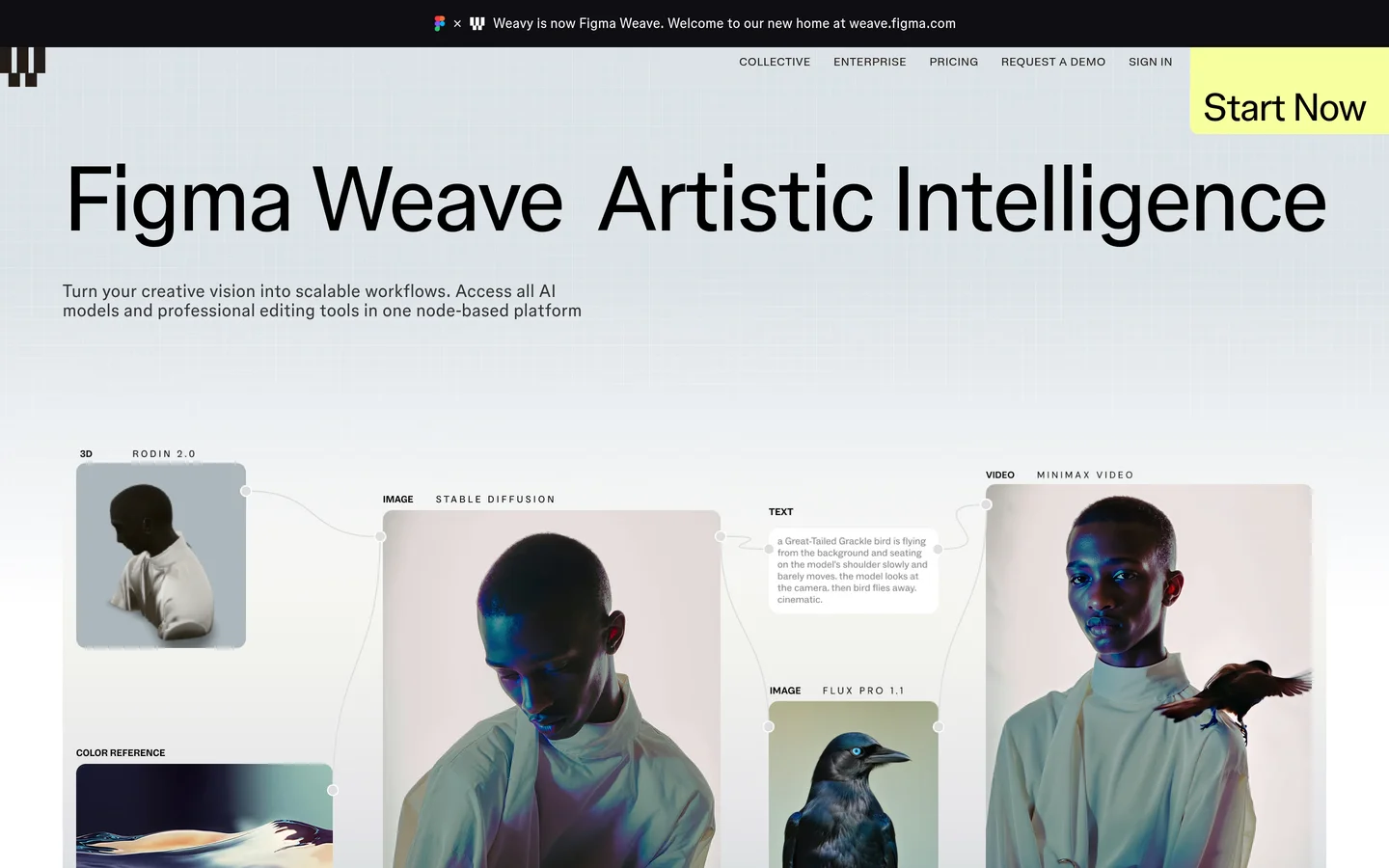
At its core, Weavy is a browser canvas. Each node is a discrete operation: text-to-image generation, video generation, style transfer, upscaling, inpainting, masking, color correction, or compositing. You wire nodes together so the output of one step feeds the input of the next, and the canvas re-runs downstream nodes automatically whenever an upstream input changes.
The API layer sits on top of that canvas. Once a workflow is built visually, you can trigger it with a REST call, pass in parameters like prompts or input images, and retrieve outputs when the run completes. Webhook callbacks and batch submission make it practical for production use rather than one-off experiments. This is the same model used by most headless AI workflow platforms: design visually, execute programmatically.
The homepage below shows the canvas itself, with generation and editing nodes wired into a single pipeline.
Node-Based Workflows, Explained
The reason node-based systems matter for image generation is that a single model call is rarely the whole job. A typical production pipeline might generate a base image, remove its background, upscale it, then composite it onto a branded template. Doing that with disconnected tools means manual handoffs at every step. A node graph encodes the whole sequence once, and models like FLUX.1 slot in as individual generation nodes within it.
The cascading update behavior is the other practical win. Change the prompt on the first node and every downstream step re-processes automatically. That makes iteration fast: you adjust one variable and see how it propagates through the entire chain, instead of re-running five tools by hand.

Multi-Model Generation Through One Endpoint
Every generation node in a Weavy workflow lets you pick which model powers it, and the setting is per-node rather than global. One workflow can use FLUX 1.1 Pro for photorealistic output, Ideogram for text-heavy graphics, and a video model for the final animation step. When you call the workflow through the API, all of that routing is handled for you; your code sends one request and gets back the finished asset.
This multi-model pattern is worth comparing across vendors before you commit. Weavy popularized the canvas-plus-API approach, but it is not the only option; platforms like wireflow.ai offer the same node-based canvas with full REST API access, and pricing and model catalogs differ meaningfully between them. The right choice depends on which models you need, how many runs you expect per month, and whether you need features like per-key spend limits.
How to Call a Workflow API in Practice
The request pattern is similar across most workflow platforms. You authenticate with an API key, reference a workflow by ID, pass parameters, and poll or receive a webhook when the run finishes. A minimal example looks like this:
curl -X POST https://api.example.com/v1/workflows/WORKFLOW_ID/run \
  -H "Authorization: Bearer $API_KEY" \
  -H "Content-Type: application/json" \
  -d '{"inputs": {"prompt": "studio product photo of a ceramic vase, softbox lighting"}}'
The asynchronous part is what trips people up. Image and video generation takes seconds to minutes, so production integrations should rely on webhooks rather than tight polling loops. Our guide to building AI pipelines with REST APIs walks through the polling-versus-webhook tradeoff with working code.
For higher volumes, most platforms accept batch submissions so you can queue hundreds of generations in one call and collect results as they complete. If that is your use case, see our breakdown of batch image generation via API, including how to handle partial failures in a batch.

Weavy API vs Other Workflow APIs
| Capability | Weavy (Figma Weave) | Typical alternatives |
|---|---|---|
| Visual node canvas | Yes | Yes (varies in depth) |
| REST API to trigger workflows | Yes | Yes |
| Per-node model selection | Yes | Usually |
| Webhook callbacks | Yes | Usually |
| Batch processing | Yes | Varies |
| Self-serve API pricing | Tied to plan tiers | Often usage-based |
The differences show up less in the feature checklist and more in the details: which generation models are available, how quickly new models land, what an API call costs at your volume, and how the platform handles team workspaces. We compared the leading options in our roundup of the top Weavy alternatives if you want the full field.
Since Weavy’s acquisition by Figma, some independent developers have also started evaluating whether the API roadmap will stay developer-first or fold into Figma’s design suite. That uncertainty alone is a reason to benchmark at least one alternative, and our comparison of AI content generation APIs covers the strongest candidates on pricing and model coverage.

FAQ
Does Weavy have a public API?
Yes. Weavy exposes a REST API for triggering workflows, submitting generation requests, and retrieving outputs, with webhook callbacks for async completion. Costs depend on the models used inside the workflow; for a sense of per-image economics, see our FLUX Pro API pricing breakdown.
What models can I run through a Weavy workflow?
Generation nodes support a range of image and video models, selectable per node. A single workflow can mix photorealistic, illustration, and video models in one chain.
Can I call FLUX models directly instead of through a workflow platform?
Yes, FLUX models are available through several inference APIs if you only need single generations. Our tutorial on calling FLUX from curl and Python shows the direct route. Workflow platforms earn their keep when you need multi-step pipelines, not single calls.
Is the Weavy API suitable for production volume?
It supports batch processing and webhooks, which are the two prerequisites for production use. As with any generation API, test latency and failure rates at your actual volume before committing.
How is a node-based API different from a plain image generation API?
A plain generation API returns one model’s output per call. A workflow API executes an entire graph, including upscaling, background removal, and compositing, in a single request. If your output needs more than one step, the workflow approach removes glue code; you can see the single-model baseline in our FLUX AI image generator guide.
What happened to Weavy after the Figma acquisition?
Weavy now operates as Figma Weave. The canvas and API continue to function, but the product direction is increasingly integrated with Figma’s design ecosystem, which is worth factoring into any long-term platform decision.
Conclusion
The Weavy API is a solid implementation of a genuinely useful pattern: build image pipelines visually, run them programmatically. If you are evaluating it, judge it on the things that vary between vendors, namely model catalog, API pricing at your volume, and roadmap stability after the Figma acquisition. It is also worth running the same pipeline on Wireflow’s AI workflow platform or another canvas-plus-API tool before you commit, since switching costs grow quickly once workflows are embedded in production code.